
Start a treatment course
Set up a course for pests or a disease: pick the problem, take Fern's suggested course or build your own, and the doses show on Today next to care. Building your own is free.
On this page
Pests and plant diseases rarely go after one spray. A treatment course plans the whole thing: what you'll do, how often, how many times, and how long to keep the plant away from the others. Once it starts, each dose shows on Today next to the plant's care, so you don't have to keep count.
Start one
You can start a course from three places:
- A plant's page: tap Treat a problem ("Pests or a disease? Doses on Today, next to care.") on the Care or Health tab.
- My Plants: tap ••• at the top, then Select plants, choose the plants and tap Treat. One course covers them all.
- A health check: tap Start a treatment on the result. The problem Fern found is picked for you and marked "Dr. Fern". See Check a plant's health.
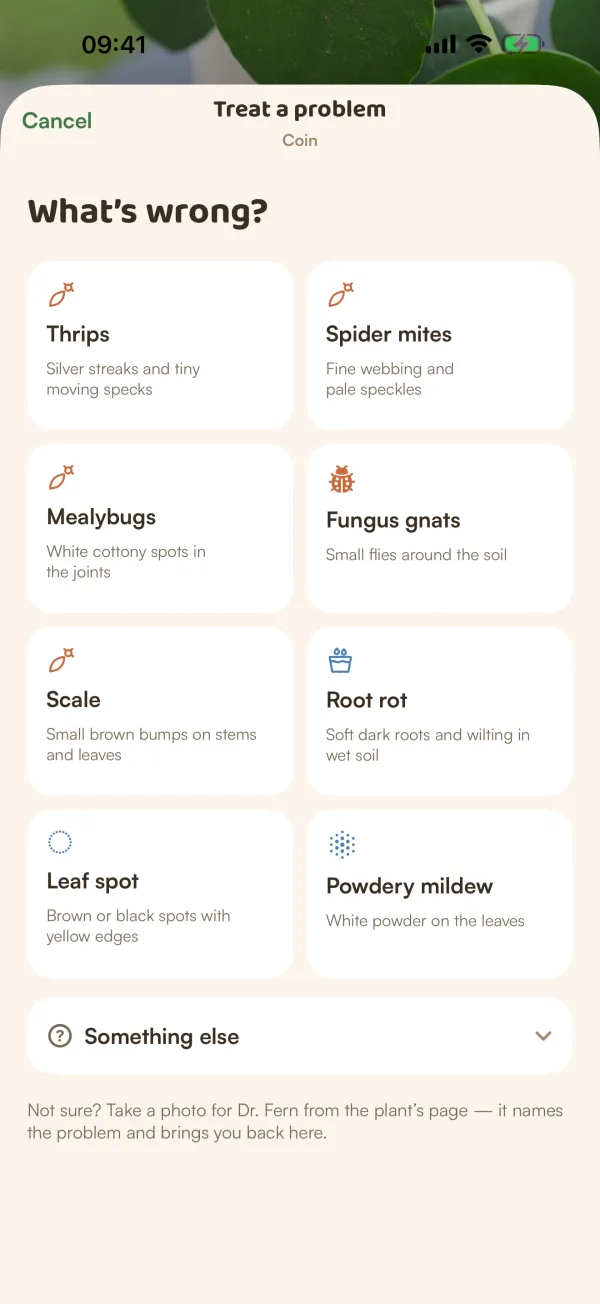
Pick the problem
Under "What's wrong?", tap the problem. Each tile has its signs, such as "Fine webbing and pale speckles" for spider mites.
Not on the list? Tap Something else, type what it is ("What is it? (e.g. aphids)") and tap Build a course for it.
Not sure what it is? "Take a photo for Dr. Fern from the plant's page — it names the problem and brings you back here."
Fern's suggested course or your own
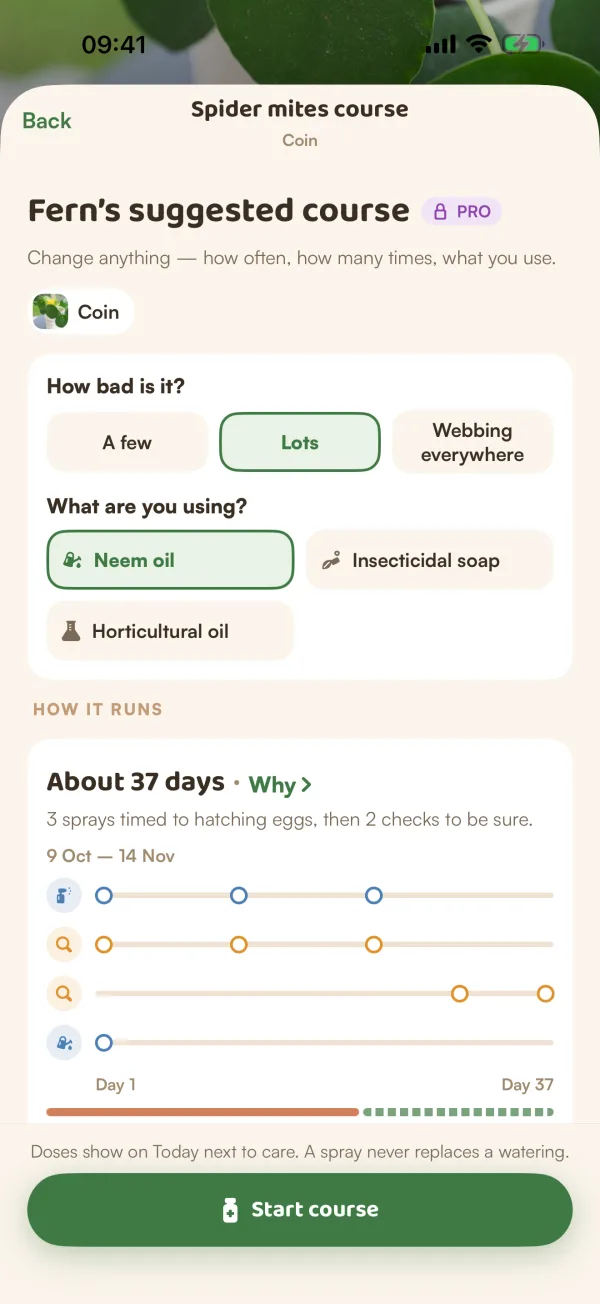
With Fern Pro, the next screen is Fern's suggested course: the steps, how often and how many times, already set up for the problem. "Change anything — how often, how many times, what you use."
- Answer How bad is it? and What are you using?. Fern works the course out again with each answer.
- Read How it runs: about how many days it takes, in what order, and Why › for what the plan is based on, step by step.
- Change any step you like (see below).
- Tap Start course.
On the free plan, Fern shows "Suggested courses come with Fern Pro" with See Fern Pro and Build my own course · free. Your own course starts with a spray and a check (a prune too, for a disease), for you to fill in.
Set up the steps
Each step has:
- What you'll do: Spray, Check, Rinse, Granules for, Wipe, Drench, Prune or Treat, and a name for it.
- How often: Once, Every day or every few days.
- How many times: Once, a number of times, or Until the course ends.
- When or Starts: today, tomorrow or a later day.
- What to use · optional: tap Choose. Pick from What I have, Usual choices or My own mix, or Add a product.
Tap Add a step for another (up to 8). The timeline under How it runs redraws as you change things.
"Follow the label for how much to use, and test it on one leaf first." Fern plans when to treat; the product's label says how.
Keep it apart
"Pests spread to plants nearby. Moving it away for a while helps." The Keep apart switch sets how long, such as Keep apart for 3 weeks, and shows the date it ends. It's often on already for pests. Change the length a week at a time, or turn it off. When other plants share the room, Fern says how many and flags them to check too.
Start
Tap Start course. Fern shows "Spider mites course started · doses are on Today", and the course page opens. "Doses show on Today next to care. A spray never replaces a watering."
Tips
- If you're not sure what the problem is, run a health check first. Its result opens the course with the problem already picked.
- Treat every plant that shows signs in one course. Select them together from My Plants.
- Pick the product you'll really use. With Fern's suggested course, the spacing between doses follows it.
What if…
What if my plant is resting on the free plan?
A course that's already running keeps reminding you: "Resting on the free plan, but treatment doses still remind you: pests don't wait." A resting plant's page doesn't offer Treat a problem. See When the free trial ends.
What if the problem isn't on the list?
Use Something else and build your own course. Fern's suggested course is for the problems on the list.
What if Start course is greyed out?
Every step needs a name, and Something else needs words for the problem.