
Check off care
Mark watering, misting, feeding and other care as done from Today, undo it if you tapped the wrong one, and pick up plants nobody has taken yet.
On this page
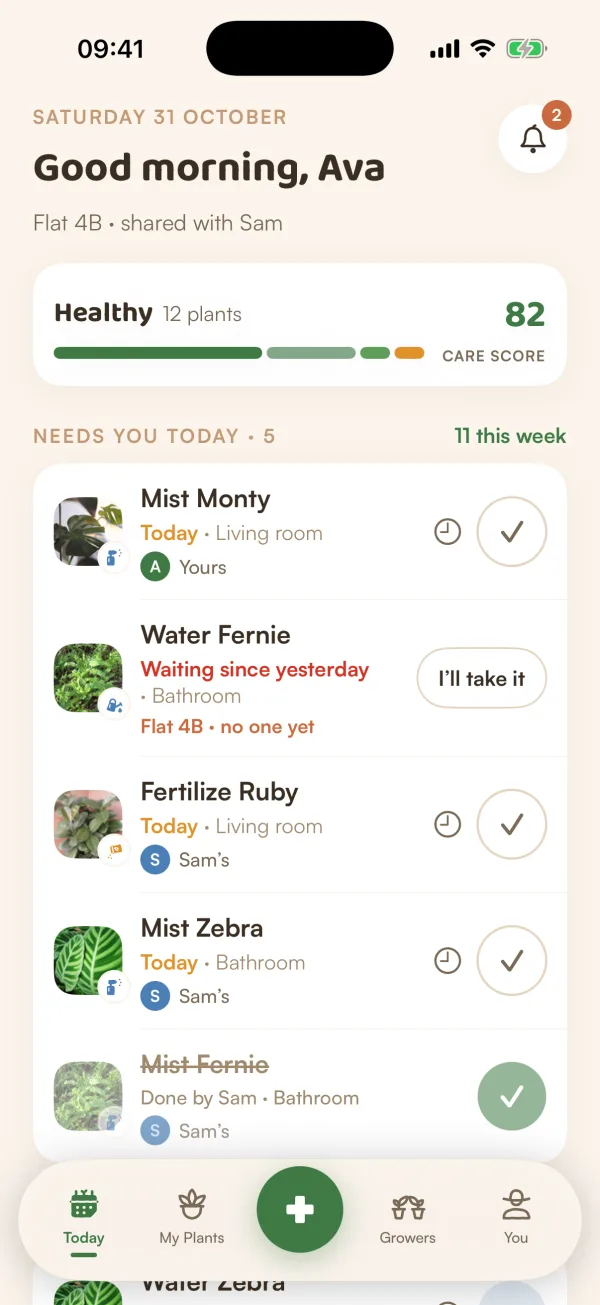
Every row on Today has one button on the right that does the job. What it looks like tells you what happens when you tap it.
Mark something done
- Find the plant on Today, under Needs you today.
- Tap the round button on the right of its row:
- A check (✓) for misting, feeding, rotating, cleaning, pruning and repotting. One tap and it's done.
- A blue water drop for watering. It asks how the soil feels first, so you never water a plant that's still wet. See Check the soil before watering.
- The row is struck through and a note appears at the bottom, such as "Fertilized Ruby", with an Undo button.
After four seconds the note goes and the row folds away. Fern logs the care on the plant's page and plans the next one.
Undo a mistake
Tapped the wrong plant? Tap Undo on the note at the bottom, before it disappears. The row comes back as if nothing happened. For a "Water + feed" row, Undo takes back both.
Only the person who did it can undo it, and only for 15 minutes. After that, Fern says "It's been too long to undo — log it differently from the plant's page".
Care someone else did
When someone in your home does a job, it stays on your list for the day, faded, with "Done by Sam" and a green check. Nothing for you to do: it's there so you can see the plant was looked after and nobody waters it twice.
Take a plant nobody has yet
In a shared home, a plant may not have a caretaker yet. Its row says "Flat 4B · no one yet" and has an I'll take it button instead of the usual ones.
- Tap I'll take it.
- The plant becomes yours: the row now says "Yours", and the clock and check buttons appear.
From then on, its reminders come to you.
More choices on a row
Touch and hold a row for more:
- Ask Sam to do it, or Ask someone…, when other people share your home. Asking someone else is part of Fern Pro.
- Remind me later.
- Not today, which opens Postpone. See Postpone a task.
When you're offline
You can still check things off. Fern keeps what you did, shows it as done, and sends it as soon as you're back online. If something couldn't be saved, Fern tells you: "Watered Monty couldn't be saved". Try it again from the row.
What if…
What if I checked off the wrong plant and the note is gone?
Open the plant from My Plants and log what really happened from its page. That's where Fern sends you for anything Today can no longer undo.
What if a row has no button at all?
It was done by someone else ("Done by Sam"). Nothing to do.
What if I want to do several plants in a row?
Use a Care Round: it walks you through them one plant at a time. See Do a Care Round.