
Your home's page
A home's page shows how the home is doing this week, its plants, places and people, what's been done lately, and the home's own settings.
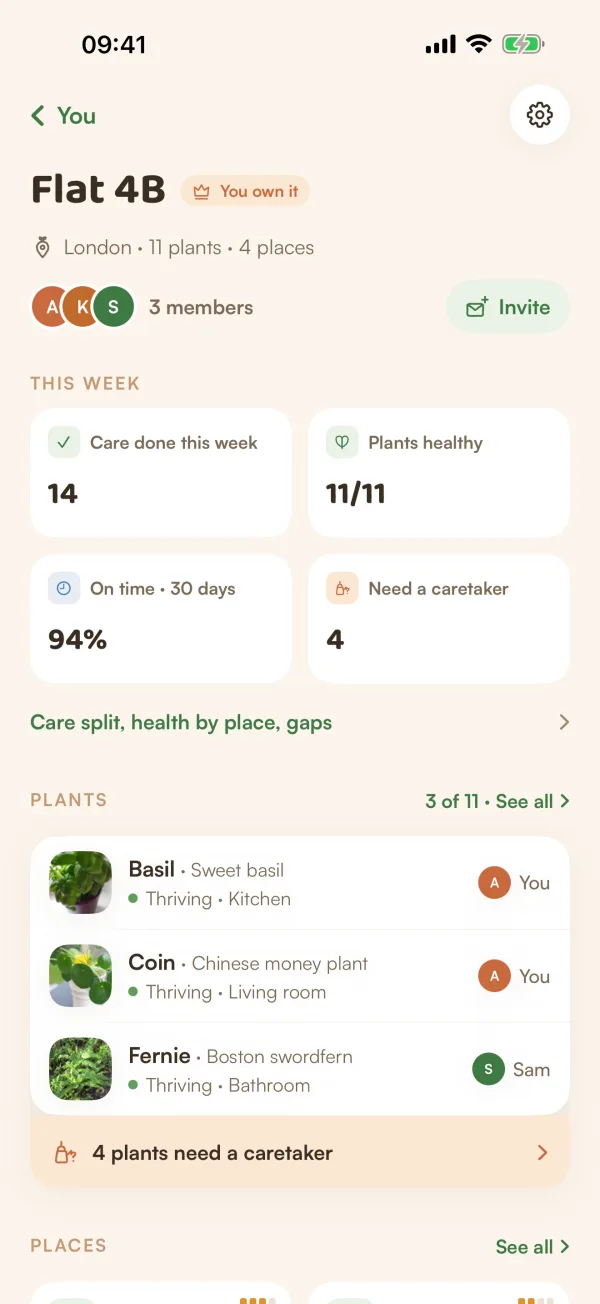
Every home has a page that answers one question: how is our home doing? It's the same page whether the home has one plant or a hundred. Each part shows a short preview and leads to its own screen.
Open it
On You, under Households, tap the home. With two or more homes, tap Your homes, then the one you want.
From top to bottom
The header. The home's name, with You own it or Member. Under it, the city, how many plants and how many places: "London · 11 plants · 4 places". Then the faces of the people in it ("3 members") and Invite. The gear at the top right opens home settings.
Someone's away. When someone in the home is away and some of their plants have nobody, a card says so: "Sam is away until Sun 4 Oct", "6 plants need someone while they're gone". See Hand off plants while you're away.
What you're covering. While a hand-off runs, a blue card says who has what: "You're covering Sam's 6 plants" with the dates and "They're in your Today."
Care round. When there's care to do, a card offers a round of the whole home: "Care round · 7 things", "About 9 min · starts in Living room · claim items together", and Start. If someone already started one, it says so and the button is Continue. See Do a Care Round.
This week. Four tiles:
| Tile | What it counts |
|---|---|
| Care done this week | Care logged in this home this week, by anyone. |
| Plants healthy | Plants doing well, out of all of them, such as 11/11. |
| On time · 30 days | How much care was done on time over the last 30 days. |
| Need a caretaker | Plants nobody has claimed yet. |
Under them, Care split, health by place, gaps opens "How the home is doing": who did how much care this month, how each place is doing, and plants or places that need a look.
Plants. The first few plants, with each one's mood, place and caretaker. See all opens the full list. When some plants have no caretaker, a line under the list says how many: "4 plants need a caretaker". Tap it to see them and claim them. See Share the care.
Places. The rooms and spots in the home, with their light and how their plants are doing. See Places.
People. Everyone in the home. Tap to see each person, ask them for help, or see who's still invited.
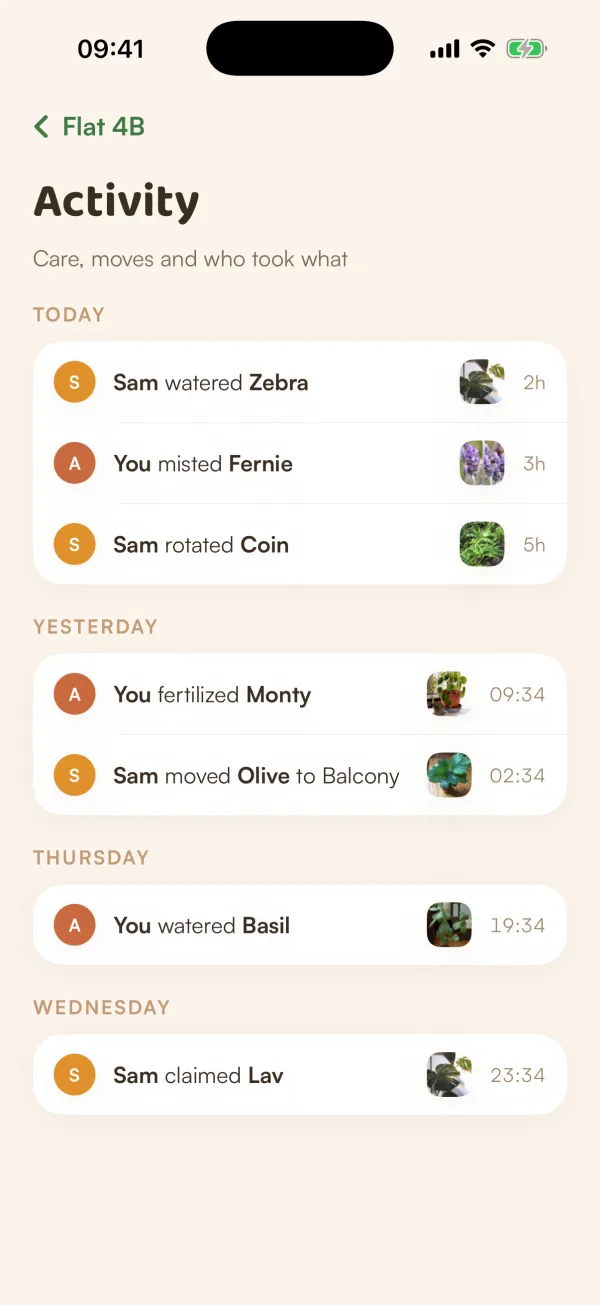
Recent activity. The last few things done here, like "Sam watered Zebra". See all opens Activity: "Care, moves and who took what", day by day.
This home. The home's own settings, one per row:
- Notifications: On or Muted, for you only.
- Location: the home's city.
- Invite code (Fern Pro).
- Hand off my plants, when someone else lives here and you look after plants in it (Fern Pro).
- Rename or delete home if you own it. If you don't, a red Leave row with the home's name sits below.
The home's plant list
See all under Plants opens every plant in the home. Search by name ("Search 11 plants"), or narrow the list with the Place, Caretaker and Mood chips. Tap the ✕ on a chip to clear it.
Plants nobody has claimed have an I'll take it button on their row.
Free and Fern Pro
Everything on this page is free to see and use for the plants in your home. Inviting, handing off to someone else and creating new homes are part of Fern Pro. On the free plan, a purple card at the top says so, and those buttons show a PRO tag.
What if…
What if it says "Couldn't load" the home?
Fern shows what it saved last time, with Retry: "Showing what we saved earlier. Care still works offline." Pull down on the page to try again. If nothing was saved yet, it says "Couldn't load this home" with Try again.
Why do I see Flat 4B instead of a list of homes?
With only one home, Fern opens it straight away. Your homes, the list, appears when you're in two or more.
Who can see this page?
Everyone in the home sees the same page. Only the owner sees Rename or delete home.