
Give a plant away
Give a plant to someone at home, to another Fern grower with a code or a link, or to someone without Fern. It stays in its family with who has it now.
On this page
Plants get passed on: a cutting for a friend, a fern for your mum, a swap with someone from Growers. When you give a plant away in Fern, its reminders stop for you, but it doesn't disappear. It stays in its family as "With Mum", with its history, and you can see where it went.
Start
Open the plant and tap Give it away, in the ••• menu or under More in its Family section. Fern asks "Give Monty to…": each person at home, then A Fern grower and Someone without Fern.
To someone at home
If you share a home, each person in it is a choice: "Sam · Flat 4B", "It stays in your home. Sam looks after it." Tap them and Sam becomes the plant's caretaker straight away: "Sam looks after Monty now". The plant stays in the home.
To another Fern grower
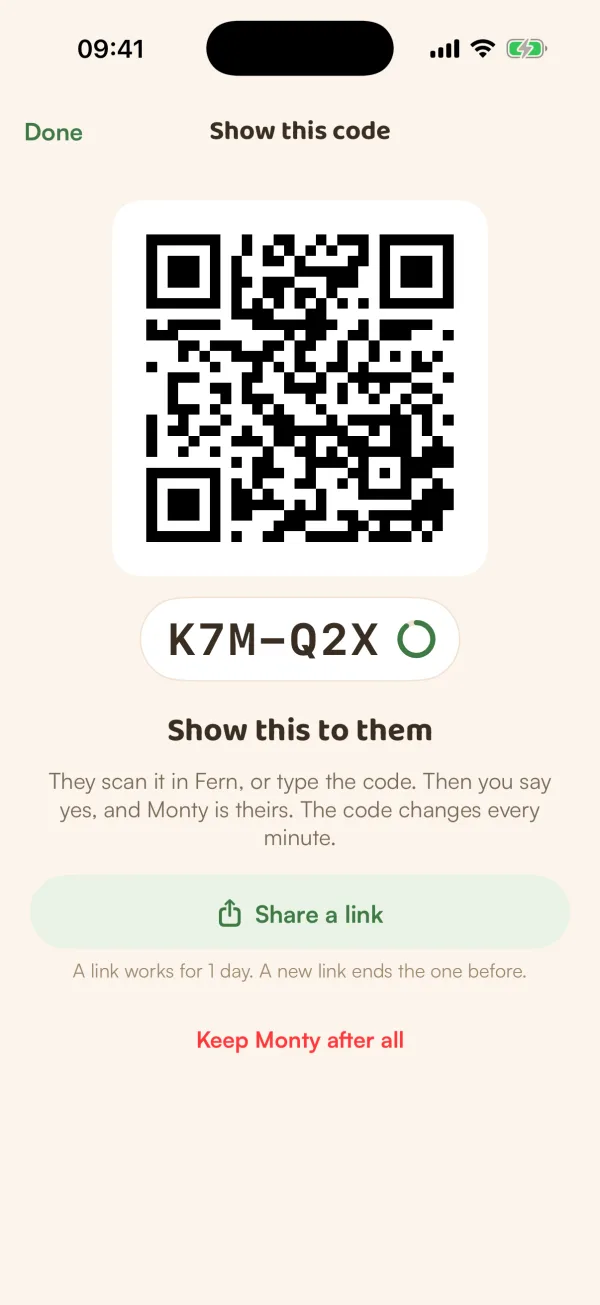
- Tap A Fern grower: "With a code or a link, and your yes."
- Under "What goes with Monty", choose what they get: Photos, Care history, Where it came from and Your notes.
- Turn on Make it a swap if they should give you one of theirs back.
- Tap Show a code.
Fern shows "Show this to them": a code to scan and a short code to type. "They scan it in Fern, or type the code. Then you say yes, and Monty is theirs. The code changes every minute."
Not together? Tap Share a link and send it however you like. "A link works for 1 day. A new link ends the one before."
When they ask for it, Fern shows "Kim wants to add Monty to their garden". Tap Approve or Decline. "Say yes and Monty is theirs: its reminders stop here. Decline, and it stays yours to give." If you said yes to a swap, their plant comes to you the same way.
Fern then says "Monty is with Kim". "It stays in its family as 'With Kim'. Its reminders have stopped here, and its history is all on its page."
Changed your mind before anyone asks? Tap Keep Monty after all. The code and the link stop working.
To someone without Fern
- Tap Someone without Fern: "Kept as a memory: who has it now. Reminders stop."
- Under "Who has it now?", type their name. You can add a photo of the handover.
- Tap Give Monty to Mum.
"Monty stays in its family as 'With Mum'. Reminders stop. It isn't deleted, and it isn't Remembered."
Afterwards
The plant's page says "Gave away to Mum" with the date. Its history stays there for you to look back on.
If it comes back to you, tap It came back on its page. Its reminders start again.
Free and Fern Pro
Giving plants away is free. A plant you give away no longer counts towards your free plan.
On the other side, a plant someone receives counts towards their plan like any other: on the free plan, if they already have one, the new one rests. See Receive a plant.
What if…
What if nobody asks for it?
The code keeps working while the screen is open, and the link for a day. A request you don't answer runs out after a day.
What if several people ask?
Each request shows with its name. Approve one: the plant goes to them, and everyone else hears it went to someone else.
What do they see about me?
Your first name and one line about where the plant came from. Never your home, your rooms or your notes, unless you chose to send your notes.