
Your Growers profile and settings
Edit your Community photo, name, bio and place, choose whether growers can find you, set your Growers notifications, or leave Growers.
On this page
Your Growers profile is what other people see when they tap your name: your Community photo, name, handle, a short bio and the plants you've chosen to share. It's separate from your Fern account, and everything on it is yours to change. Editing it is free.
Open your profile
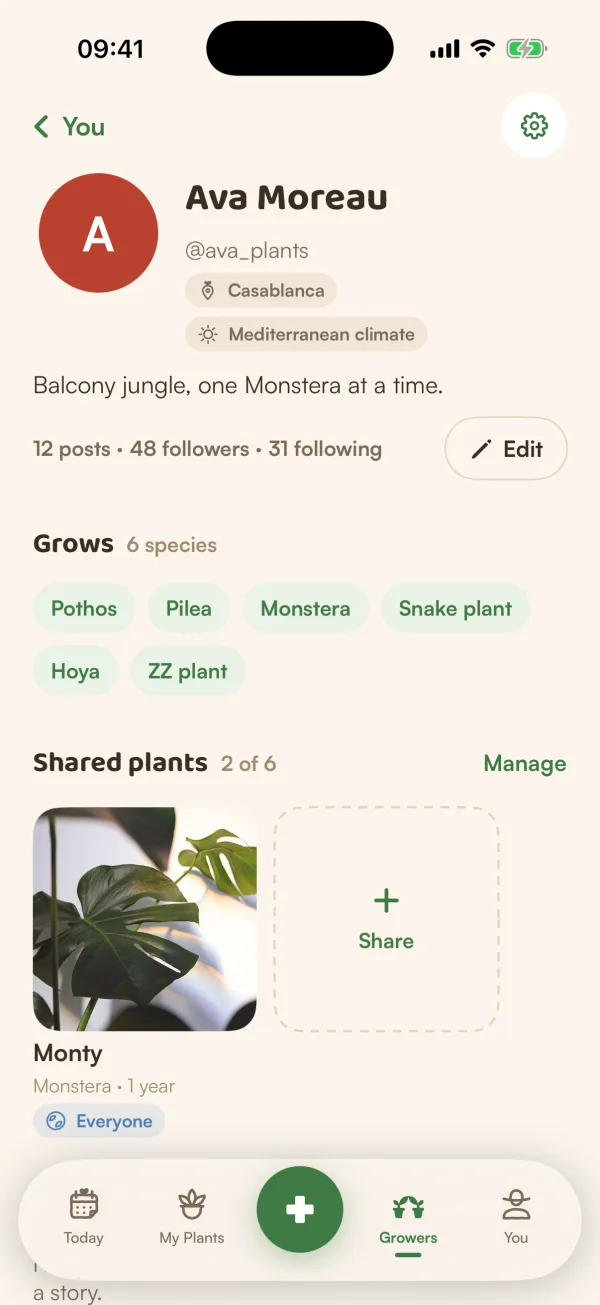
On Growers, tap your photo at the top right. Your profile shows:
- Your photo, name, @handle, the place you typed and, if you allow it, your climate.
- How many posts you have, and your followers and following. Tap a count to see the list.
- Grows: the kinds of plants you keep.
- Shared plants: the plants others can see. Tap Manage to change who can see each one.
- Posts & notes: everything you've shared.
Before you've shared anything, it says "Nothing shared yet. Your plants are private until you choose otherwise." with Share a plant and Write a note.
Edit your profile
- On your profile, tap Edit.
- Change what you like:
- Your photo: tap it to choose another. "A photo just for Community. It doesn't change your Fern profile photo."
- Display name.
- Bio, up to 160 characters.
- Place: "A city or region. Never your exact location."
- Tap Save.
Your handle can't change: it shows as "@yourhandle · handles can't change".
Profiles are checked like posts. If something doesn't pass, Fern says "That doesn't fit the Community rules. Try a different name, bio, place or photo."
Growers settings
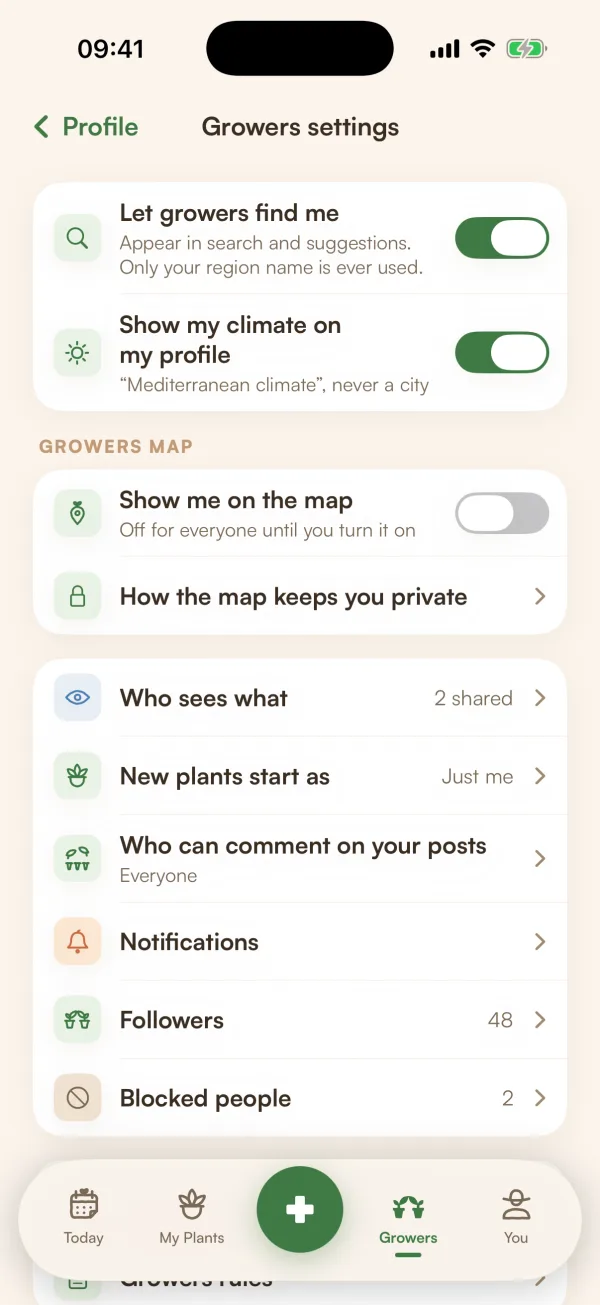
On your profile, tap the gear for Growers settings:
| Setting | What it does |
|---|---|
| Let growers find me | On: "Appear in search and suggestions. Only your region name is ever used." Off: "you won't appear in search, suggestions or “Popular in your region”. People who already follow you still can." |
| Show my climate on my profile | Shows your climate, such as "Mediterranean climate", never a city. |
| GROWERS MAP | Whether you're on the map, and how. See Use the Growers map. |
| Who sees what | Every plant you added and who can see it. |
| New plants start as | Just me, My followers or Everyone on Growers. The last two need Fern Pro. |
| Who can comment on your posts | Your usual choice for new posts: Everyone, People I follow or Off. |
| Notifications | Growers notifications (below). |
| Followers | Your followers, with Remove follower on each. |
| Blocked people | People you've blocked, with Unblock. |
| Who sees what on Fern | A short summary of what's private and what's public. |
| Growers rules | The full rules, to read again. |
| Leave Growers | Hides your profile, posts and comments. |
Turning off Let growers find me also takes you off the Growers map.
Growers notifications
Tap Notifications in Growers settings. One switch, Growers notifications, turns them all off at once. Below it, set each kind to Push, In app or Off:
- About you: Comments and answers, Helpful marks, New followers, Likes ("Grouped per post, never one by one"), Votes on your polls, When your poll ends.
- From growers you follow: Posts and notes, Shared plants and new photos, Questions you could answer ("About plants you grow — at most 3 a day").
Turn on Daily digest instead to keep everything in the app with one push at 6 pm. Notes from our team about your account and safety are always on. "Stories never send a notification — new ones show as a green ring."
Fern's other notifications are in You. See Notifications.
Leave Growers
- In Growers settings, tap Leave Growers.
- Confirm with Leave Growers.
"Your profile, posts and comments are hidden. Rejoin any time as @yourhandle — they'll come back."
What if…
What if I want a different handle?
Handles can't change, even if you leave and rejoin. You can change your display name at any time.
Does my Community photo change my Fern photo?
No. They're separate. Your Fern profile photo is in You. See Edit your profile.
Who can see my place?
Anyone who opens your profile sees the words you typed. Fern never adds your exact location.