
Comment, like and follow
Answer questions, reply to comments, like posts and follow growers whose plants you enjoy. Their posts then show in your Following feed.
On this page
Growers works because people answer each other. Comments let you answer a question or say something about a post, likes show you enjoyed it, and following someone puts what they share in your Following feed.
Comment on a post
- Tap a post to open it.
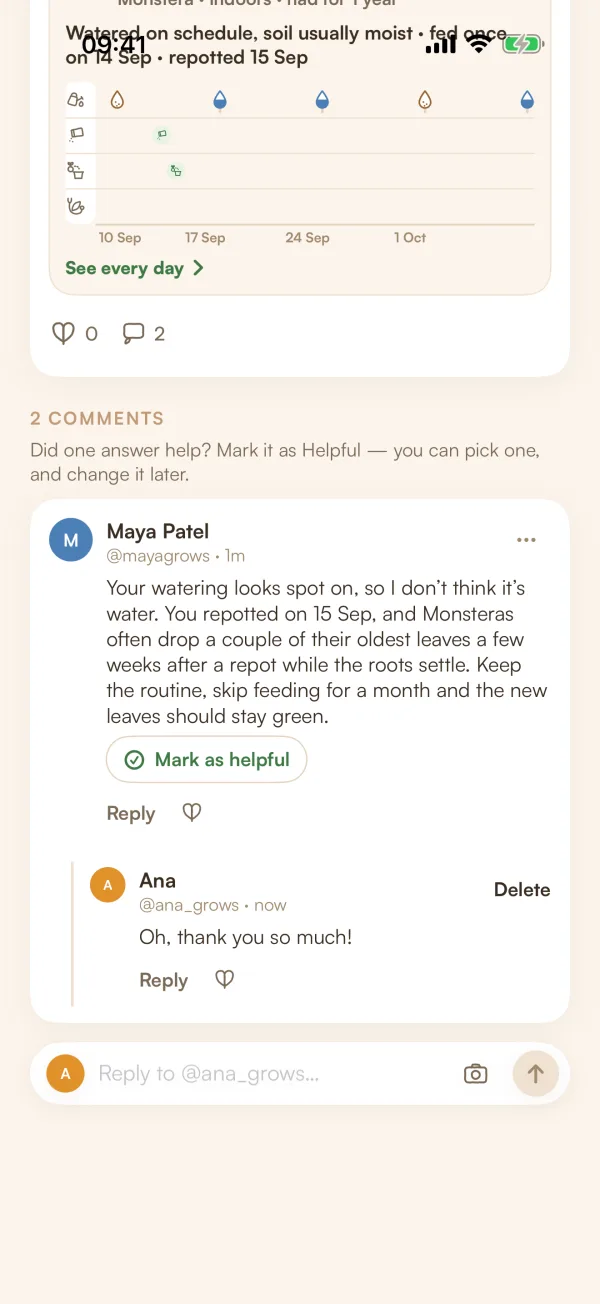
- Write in the bar at the bottom. It says who you're answering, such as "Reply to @sam_grows…".
- To add a photo, tap the camera button, choose one and describe it under Describe the photo.
- Tap the send arrow.
Comments are checked like posts. Yours may show "Waiting for a quick check, only you can see this comment." for a moment.
Reply to a comment
- Tap Reply under the comment. The bar says "Replying to @name".
- Write your reply and send it.
Replies sit under the comment they answer, one level deep. A comment shows its latest two replies. Tap the line that says, for example, "View 3 more replies" for the rest. To stop replying, tap ✕ in the bar.
To delete your own comment or reply, tap Delete next to it and confirm.
Like
Tap the heart under a post, a comment or a reply. Tap it again to take the like back. If the author has like notifications on, Fern groups them per post, never one by one.
Follow a grower
Tap Follow wherever you see it: on someone's profile, on a plant they share, in Growers like you, in search results or on the map. It turns to Following. Tap Following to unfollow.
What they share now appears in your Following feed, newest first: posts, notes, questions, shared plants and new photos of them. Their stories appear as rings at the top. If they share a plant with their followers, you can see it too.
Your follower and following counts are on your profile. Tap them to see the lists.
Remove a follower
- On your profile, tap your followers count.
- Tap ••• on the person's row, then Remove follower, and confirm.
"@sam_grows won't see your posts in their Following tab. They aren't told."
Who can comment on your posts
Each post has its own setting: Everyone, People I follow or Off. You choose it when you publish ("Comments: Everyone"), and can change it later from ••• on the post, under Who can comment. "Comments already there stay. Only new ones and replies follow this."
Your usual choice for new posts is in Growers settings, under Who can comment on your posts.
When a post is closed to you, the bar shows why, such as "Comments are off on this post."
Mark an answer as helpful
On your own question, tap Mark as helpful under the answer that helped. It moves to the top on a green background, with "Helpful · picked by" your handle. You can pick one, and change it later. Marking is free. See Ask other growers a question.
What if…
What if it says "That's a lot of comments for one hour"?
There's a limit on how many comments you can send in an hour. Take a short break and try again.
What if my comment doesn't fit the rules?
Fern says "That doesn't fit the Community rules — try saying it another way." Change the words and send it again.
What if a comment says "Comment deleted"?
Its author deleted it, but replies to it stay, so the conversation still makes sense.