
Get around Fern
Fern has four tabs and a green + button. Here's what lives where, how to swipe between tabs, and how to replay the short tour.
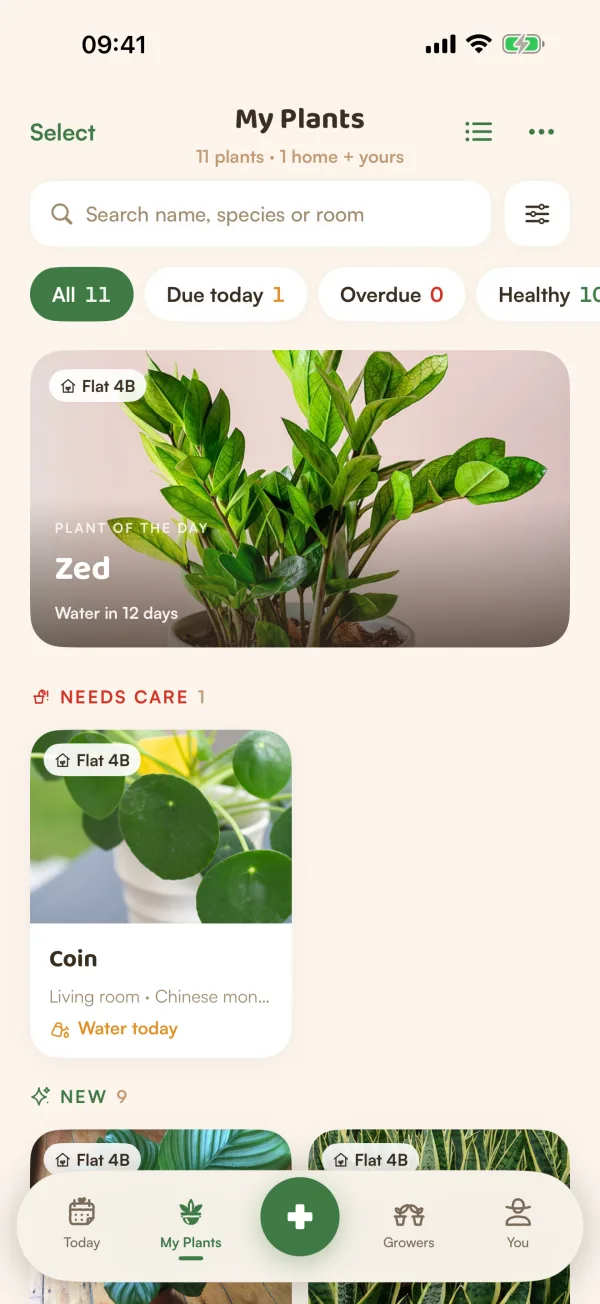
Fern is built around one question: what do your plants need from you? The bar at the bottom of the screen takes you to everything else. Four tabs sit either side of a green + button, and you can move between the tabs with a swipe.
The tabs
| Tab | What's there |
|---|---|
| Today | What your plants need today, Care Rounds, the weather, and the Explore shelf: the plant library, guides, plants that thrive near you and the light meter. |
| My Plants | Every plant you look after, with search, filters and each plant's page. |
| Growers | Fern's community of plant people, in two feeds, Following and For You. |
| You | Your profile and stats, your membership, Away mode, notifications, homes, your data, settings and help. |
Explore isn't a tab of its own. It's a shelf on Today, headed Explore (or This week when Fern has a pick for you). Tap one of its cards, or Open Explore.
To move between tabs, tap them, or swipe sideways on the screen. A swipe steps along Today, My Plants, Growers and You. On Growers it stops at Following and For You on the way.
The + button
The green + in the middle opens a sheet with everything you can make:
- Add a plant and Scan a plant, at the top.
- Under SHARE WITH GROWERS: Post ("A new leaf, a setup"), Ask a question ("Get a second opinion"), Note on a plant ("A short update on one of yours") and Story ("A photo for 24 hours").
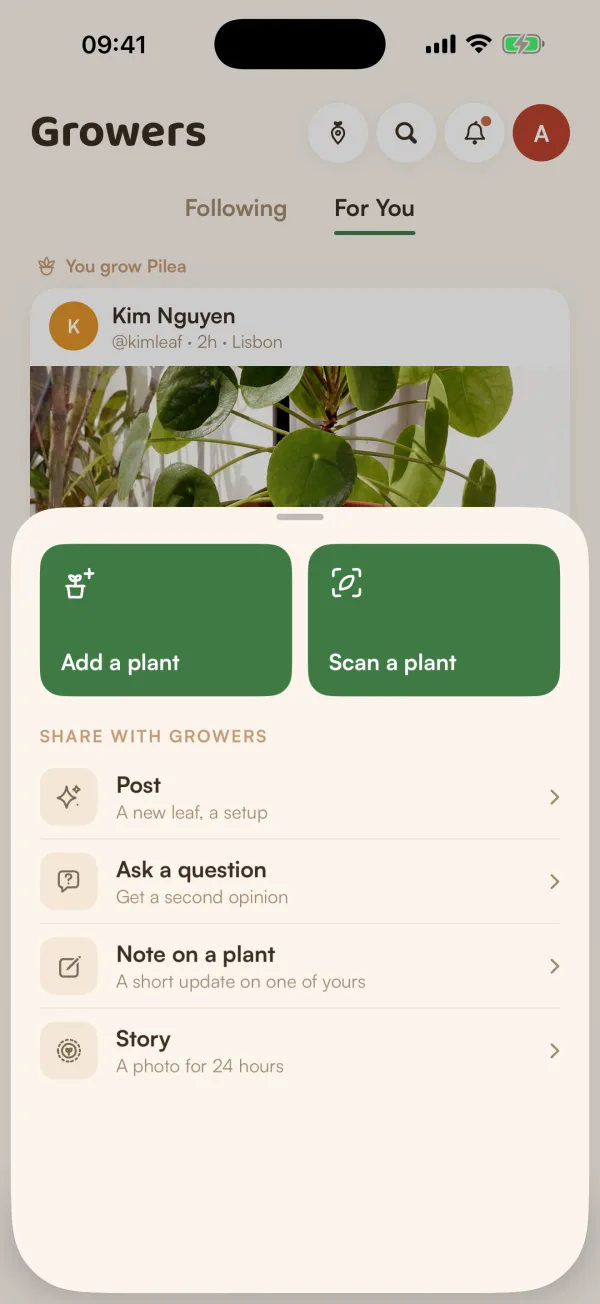
Swipe the sheet down to close it.
Locked things
Anything that's part of Fern Pro still shows on the free plan, greyed out with a small PRO lock. Tap it and Fern explains what it is, says "Watering, reminders and care stay free", and offers See Fern Pro plans or Not now. See What's free and what's in Fern Pro.
The tour
Right after you add your first plant, Fern shows a three-stop tour on Today: "Name any plant", "Today's care" and "Reminders that adapt". Tap Next to go on, Back to go back, or Skip to end it. The last stop says Start caring.
Four more stops appear later as one-time tips, the first time you open that part of Fern ("Tip 5 of 7"): help for sick plants, caring together in a home, a plant's family, and Growers. Tap Got it, or Skip tips to turn the tips off.
To see it all again, go to You › Take the tour again ("7 stops · under a minute"). "Seven short stops. Start anywhere." Tap a stop, or Start from the beginning.
Tips
- Ask Fern is on Today: "Ask Fern, or tell it what you did". Tap the microphone to talk instead of typing. Ask Fern is part of Fern Pro.
- Switch Tips on new screens off or on in You, under Support: "A one-time tip the first time you open each tab".
- Help & FAQ in You has short answers to common questions, and Send feedback reaches the people who make Fern.
What if…
Where did Explore go?
It's on Today, as a shelf of cards: Plant library, Guides, Thrives near you and Light meter. Scroll down Today to find it, then tap Open Explore beside its heading.
What if I skipped the tour by mistake?
Nothing is lost. You › Take the tour again shows all seven stops whenever you like.
Why is Add a plant locked?
The free plan looks after one plant, so Add a plant shows a PRO lock once you have it. As a guest, Fern asks you to save your garden instead, which starts your free trial with room for every plant. See Save your garden.