
A plant's family, and sharing a pot
Cuttings, divisions and gifts keep a family tree around the plant they came from. And when several plants share one pot, Fern can water them as one.
On this page
Plants have families. Take cuttings from your monstera, divide your fern, give a piece to a friend, and Fern remembers where each one came from. A plant's page shows its family, and a family page shows the whole tree.
See a plant's family
Open a plant and scroll to Family.
- A plant with no family yet says "Start Coin's family", with Take cuttings and More (Divide it, Give it away).
- A plant with a family shows its name and a short summary. Tap See all for the family page.
- While cuttings are rooting, a line says how many: "3 babies rooting". Tap it to open Rooting.
The family page
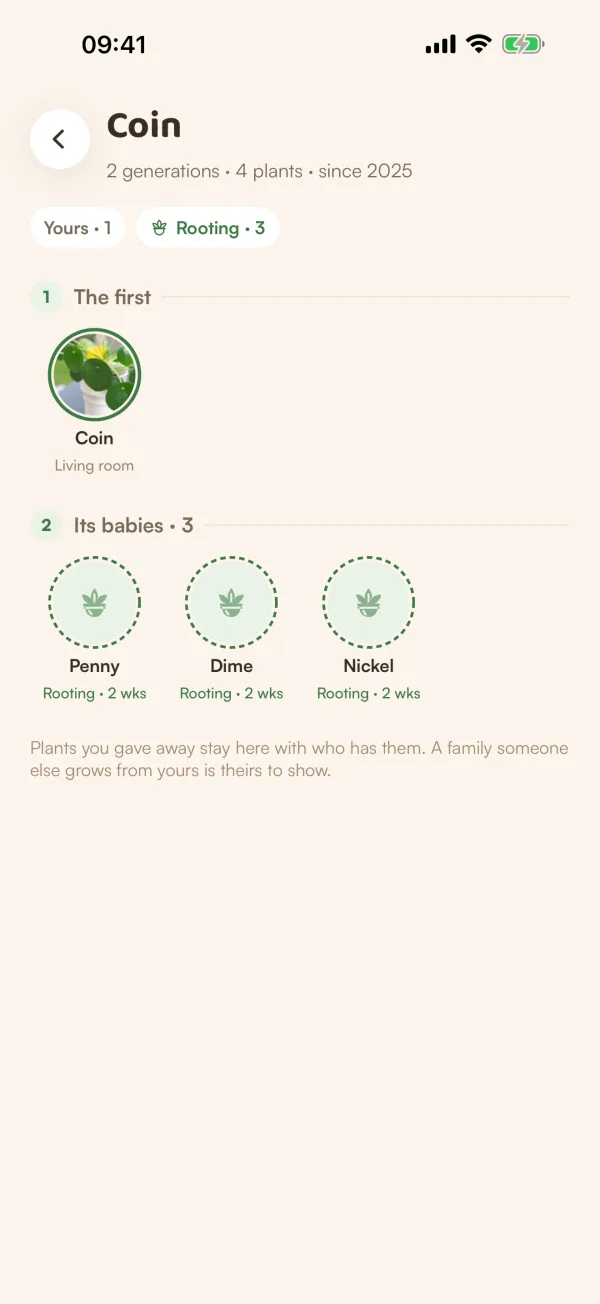
The family page lists every plant in it by generation: The first, then Its babies, and so on. The line under the name says how many generations and plants there are, and since when. Chips count what's where, such as "Yours · 1" and "Rooting · 3". When a generation has a lot of plants, tap See all to open it.
Each plant shows how it's doing: in a room, rooting, or with someone else.
- Plants you gave away stay in the family "with who has them", like "With Mum".
- Cuttings that didn't root stay as a faint "didn't root", only for you.
- A plant you lost still heads its family. "It's in Remembered, and still heads the family."
"A family someone else grows from yours is theirs to show." If a friend takes cuttings from a plant you gave them, those are in their family, not yours.
Put plants in one pot
When several plants share one pot (a bowl of succulents, two pothos trained together), they can't be watered on separate days. Tell Fern, and it plans one watering for the pot.
- On My Plants, tap ••• at the top, then Select plants.
- Tick two or more plants.
- Tap One pot.
- Choose how:
- Shares a pot (Recommended): "Each keeps its page, history and family. One watering for the pot. Take one out any time."
- One plant: "Merged into one plant. Their histories become chapters and their family links move. It can't be split again."
- Give the pot (or the plant) a name, like "Office bowl".
- Tap Put them in one pot (or Make them one plant, then confirm).
With Shares a pot, the screen shows how often the pot gets watered. Fern goes by the thirstiest plant, with a soil check first, so the one that likes it drier isn't overwatered. Each plant's page then says "Shares the Office bowl", and who with.
Take a plant out of a pot
Open the plant and, under One pot on its Care tab, tap Take Pip out of the pot. "It gets its own watering again. The others keep sharing the pot." Tap Take it out.
Plants made into One plant can't be split again.
Free and Fern Pro
Family pages and sharing a pot are free. Dividing a plant adds new plants, so on the free plan it needs Fern Pro. See Divide a plant.
What if…
What if I'm not sure which to choose, Shares a pot or One plant?
Choose Shares a pot. You can take a plant out any time. One plant can't be undone.
Can I see the family of a plant I gave away?
The plant stays in its family on your side, "With" whoever has it now, with its history.