
Reminders aren't arriving
Go through the reasons a care reminder doesn't come, from your phone's notification settings to quiet hours, a muted home, a paused or resting plant, or away mode.
On this page
Fern only sends a reminder when something is due, and gathers the day's care into one morning message. So a quiet phone can be good news. If you expected a reminder and none came, go through the checks below, roughly in this order.
When reminders come and what they say is in Morning reminders.
1. Notifications are on for Fern
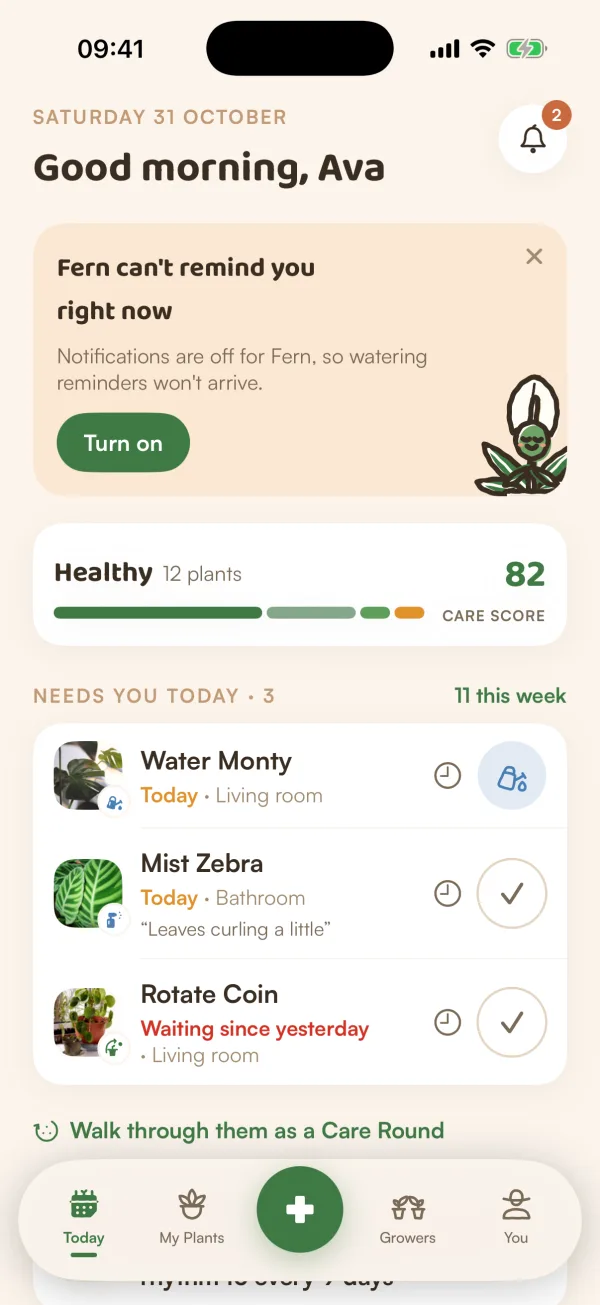
Open You. If the Notifications row says "Off in iOS Settings" or "Not set up", your iPhone isn't letting Fern notify you. Today shows it too: "Fern can't remind you right now".
Tap Turn on on Today's card, or open Notifications and tap Turn on notifications or Turn on in iOS Settings. On iOS Settings' page for Fern, allow notifications, then come back. Fern notices as soon as you return.
2. Fern's own switches are on
In You › Notifications, check that Push notifications and Care reminders are on. See Choose your notifications.
3. Quiet hours
If Quiet hours are on, "Reminders wait until quiet hours end." A reminder held overnight arrives when they finish. Check the From and To times.
4. The home isn't muted
If the plant is in a shared home, look under Per household in Notifications. A home that says "Muted" sends you nothing, care reminders included.
5. The plant is yours to remind about
- Paused: a plant whose page shows "Reminders paused" doesn't remind you. Open it, tap ••• and choose Resume notifications. See Pause a plant's reminders.
- Resting: on the free plan, Fern looks after one plant. The others show "Resting · no reminders". See When your free trial ends.
- Someone else's care: in a shared home, a plant with a caretaker reminds its caretaker. Without one, everyone in the home who is around gets the reminder. See Choose a plant's place and caretaker.
6. You're not away
While away mode is on, care is paused: "Fern won’t remind you, and nothing will count as late while you’re gone." On You, the Away mode row shows when you're back. Tap I'm back when you are. See Away mode.
7. Something was due
Fern doesn't send anything on days with nothing due. Check Today: if it says "Nothing needs you today", there was nothing to remind you about.
8. You're signed in on this phone
Reminders go to the phones you're signed in on. If you signed out, or someone else signed in on this phone, sign in again with your account. See Sign out.
Tips
- Your morning reminder comes at your local time, so keep your location up to date if you've moved. See Set your location.
- Care still shows on Today even when a reminder doesn't arrive. A quick look each morning catches anything a notification missed.
What if…
What if I get reminders for one plant but not another?
Check the second plant: it may be paused, resting on the free plan, or in a home where someone else is its caretaker.
What if reminders stopped after my trial ended?
On the free plan, Fern reminds you about one plant. The others rest until you choose a different plant or go Pro. See When your free trial ends.