
Report or block someone
Report a post, comment, story, plant or profile to Fern's team, privately. Block someone so you no longer see each other on Growers. Both are free.
On this page
Most of Growers is kind, and the rules keep it that way. When something isn't, you can report it to our team, and you can block a person so you stop seeing each other. Reports are private, blocking is quiet, and neither needs Fern Pro.
Report something
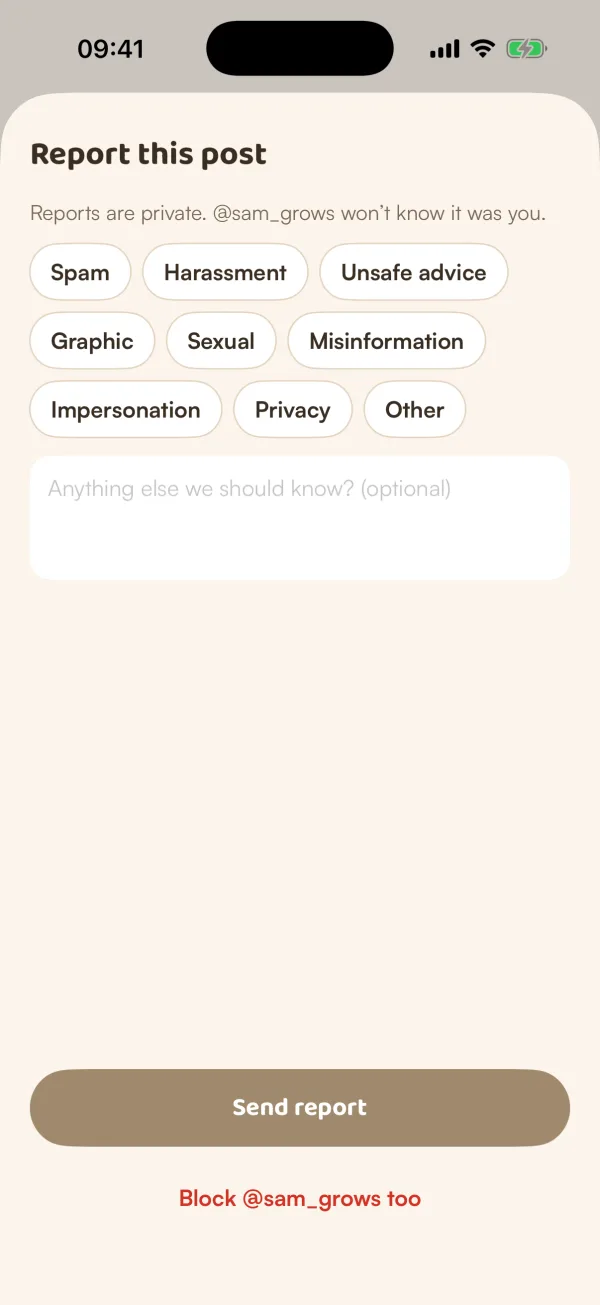
- Tap ••• on what you want to report:
- A post: on its page, then Report post. From a card in the feed, ••• opens Not interested, with Report at the bottom.
- A comment: ••• on the comment, then Report comment.
- A profile: ••• at the top of the profile, then Report @name.
- A story or a shared plant: •••, then Report.
- Choose a reason: Spam, Harassment, Unsafe advice, Graphic, Sexual, Misinformation, Impersonation, Privacy or Other.
- Add anything else in "Anything else we should know? (optional)".
- Tap Send report.
Fern says "Thanks — our team will take a look". "Reports are private. @name won't know it was you."
For a story or a shared plant, Fern asks "Why are you reporting it?" and sends the report as soon as you tap a reason.
To block the person as well, tap Block @name too under a post, comment or profile report.
Block someone
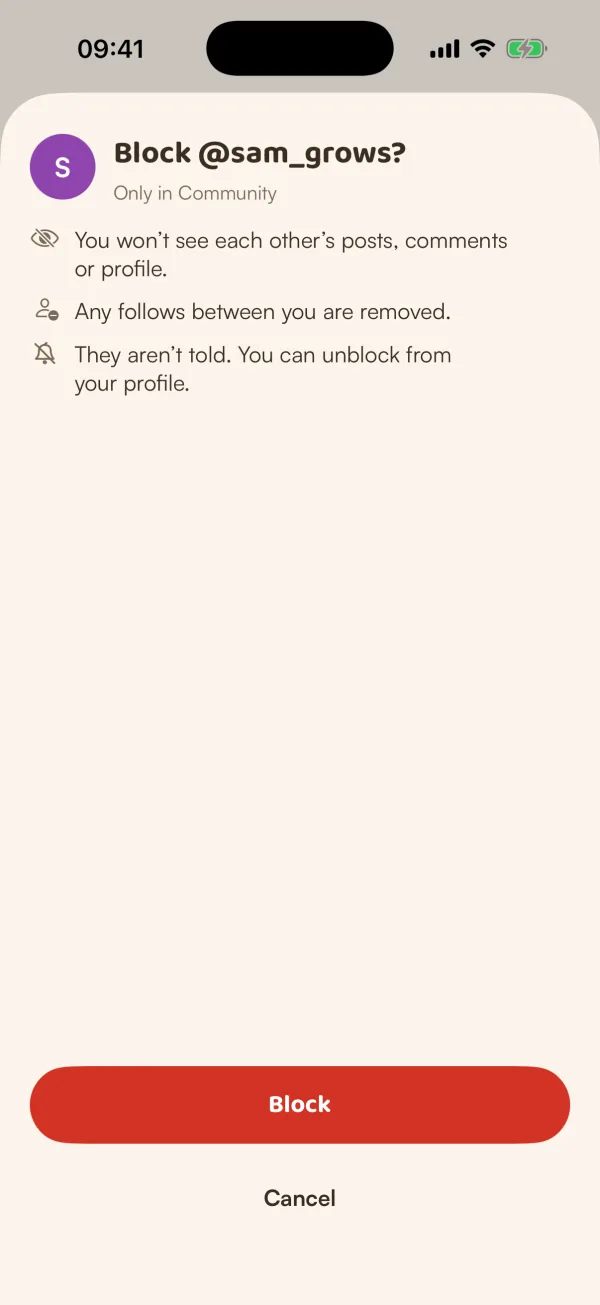
- Tap ••• on their post, comment or profile, then Block @name.
- Read what happens, then tap Block.
Blocking is "Only in Community":
- "You won't see each other's posts, comments or profile."
- "Any follows between you are removed."
- "They aren't told. You can unblock from your profile."
Fern confirms "@name is blocked". If you open their profile again, it says "You blocked @name. You won't see each other on Growers. They weren't told."
Blocking reaches the rest of Growers too: you don't exist on each other's Growers map, and votes from growers you've blocked aren't counted or shown on your polls.
Unblock someone
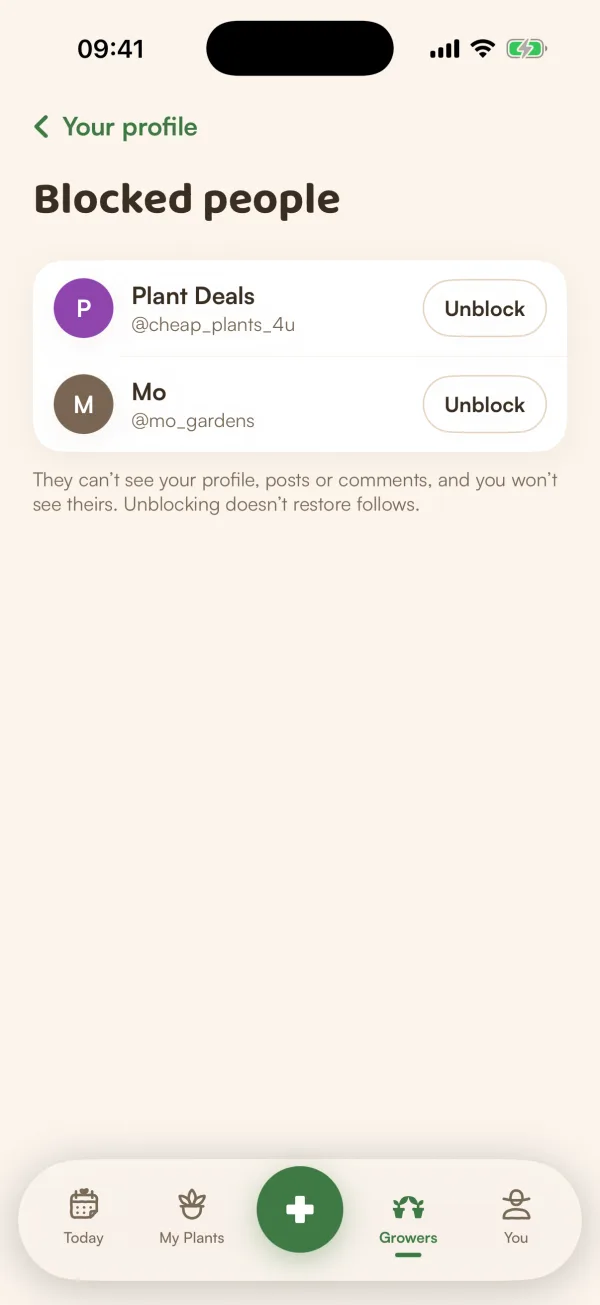
- On Growers, open your profile, tap the gear, then Blocked people.
- Tap Unblock next to the person.
"They can't see your profile, posts or comments, and you won't see theirs. Unblocking doesn't restore follows." To follow each other again, you each follow again.
You can also unblock from their profile: tap •••, then Unblock @name.
See less without reporting
Not everything needs a report. On a card in For You, tap ••• and choose Fewer like this, Fewer from @name or Fewer about a plant. See Browse Growers.
The rules
The Growers rules are in Growers settings, under Growers rules, and on the web at fernplant.app/community-rules. The short version: be kind, keep it about plants, share safe advice, protect privacy, and only post photos you took or may share.
What if…
What if someone blocked me?
Their profile looks like any profile that isn't there: "This grower isn't available". Fern doesn't say who blocked you.
What if I'm told I'm paused from Growers?
Our team can pause an account that broke the rules. Growers then says "You're paused from Community for now", or until a date, sometimes with a note from the team. "You can still read. Your plants and reminders work as usual." Tap Read the rules to see them again.
What if something I posted was removed?
Posts, comments and photos are checked for safety. Something that doesn't fit the rules doesn't go up, or comes down. Opening it shows "This is no longer available".
Do reports or blocks need Fern Pro?
No. Reporting, blocking and unblocking are free.