
Your plant's page
A tour of a plant's page in Fern: what's due now, its schedule and care rhythm, its health, its history and its species, and where each button leads.
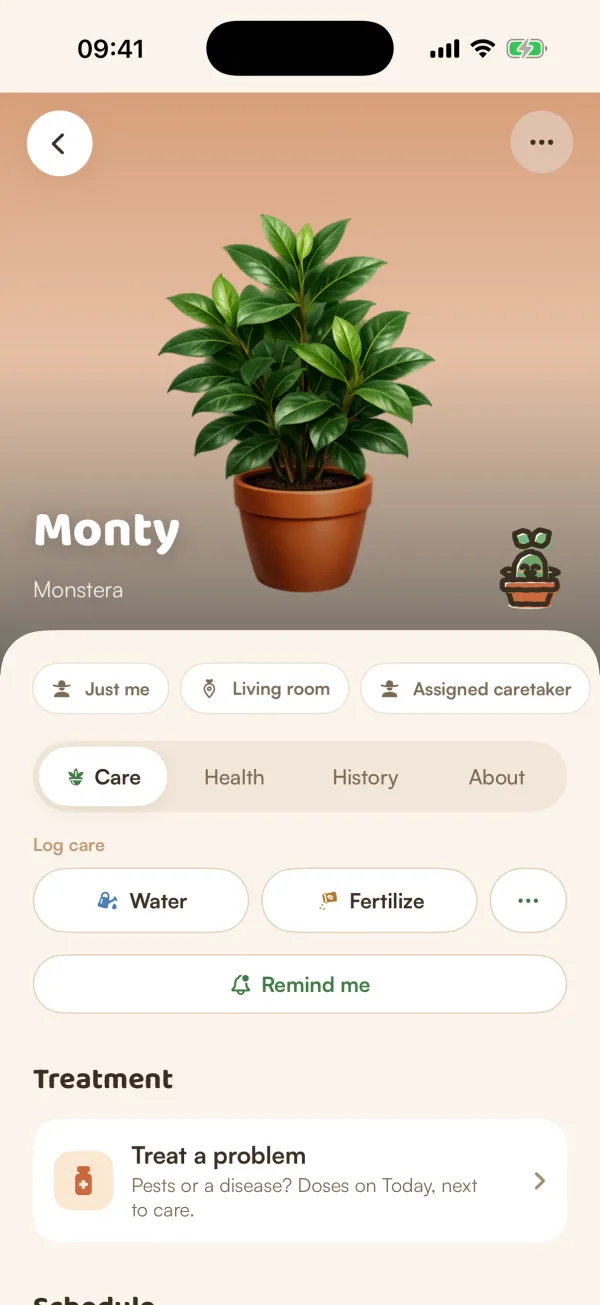
Every plant has its own page, with everything Fern knows about it: what needs doing now, what's coming, why its schedule is what it is, how it's doing and what has happened to it. Tap any plant, in My Plants, on Today or in a home, to open it.
At the top
- The photo, with the plant's name and species. Tap the photo to see all its photos full screen. Without a photo of your own, Fern shows a picture of its species.
- Sprig, Fern's little mascot, shows the plant's mood: happy, proud, thirsty, or sleepy when it's resting.
- The chips under the photo: its home (or Just me), its place (or Choose place), its caretaker (or Assign caretaker), and Reminders paused if you paused them. Tap one to change it. See Change a plant's place or caretaker.
- ••• at the top right: everything else you can do with the plant (see below).
- The back arrow at the top left.
If the plant is shared on Growers, a row says who can see it. If you're away or someone is covering its care, a banner says so.
Below that, four tabs: Care, Health, History and About.
Care
What to do, and how Fern plans it.
- Right now appears only when something needs you: care that's due or late, a soil check, or a health check. Tap Mark done on a task; a watering asks how the soil feels first. When Fern would like a soil check, it says Feel the soil with a Check the soil button.
- Log care: Water, Fertilize, and ••• for anything else. See Log care you've done.
- Ask someone (in a shared home) and Remind me. See Ask someone or set a reminder.
- Schedule: the next few cares as a timeline. See all shows the next 3 months.
- Care rhythm: why the schedule is what it is, how often it gets water and food, and Measure the pot. Customize changes it. See Why Fern waters when it does and Set your own care schedule.
- Family: its cuttings, where it came from, and Take cuttings. See Take cuttings.
- Fern's summary: one line on how it's going, with Why? for the reasons.
- Questions about its species: what other growers asked, and a way to ask your own. See Ask other growers.
A plant resting on the free plan shows Resting instead: "Fern isn't reminding you about Monty right now", with Keep this one instead while you can still choose. See When the free trial ends.
Health
How the plant is doing.
- Treatment and Recovery plan, when one is running.
- How Monty is doing: its mood, with Check plant health and Ask Fern. See Check a plant's health.
- Current conditions: its soil, light and humidity.
- Fern's read, with Why today?, and cards such as Soil moisture, Watering rhythm, How this spot fits and Care through the year, as Fern learns more.
- Progress: its two latest photos from notes and care logs, side by side, before and now.
- Mood history.
History
Everything that happened to the plant, newest first: care, notes, photos, measurements, soil checks, health checks and treatment doses. At the top, Add to Monty's story has Measure it and Add a note. See See a plant's care history, Add photos and notes and Track how a plant grows.
About
Its species: how easy it is to care for, how often it likes water, the light it needs, whether it's safe around pets, and more about where it comes from. If Fern doesn't know the species yet, this tab says so.
The ••• menu
| Item | Where it's explained |
|---|---|
| Rename, Change species, Add your photo / Change photo, Key dates · birthday, Remove plant | Rename, edit or remove a plant |
| Log care, Care history | Log care you've done, See a plant's care history |
| Post on Growers, Share to your story, Who can see it | Who can see your plants |
| Take cuttings, Divide it, Give it away | Take cuttings, Give a plant away |
| Ask Fern | Ask Fern |
| Pause notifications | Pause reminders for a plant |
| Move plant | Change a plant's place or caretaker |
| Add measurement | Track how a plant grows |
| Check plant health | Check a plant's health |
| Mark as died… | Say goodbye to a plant |
Items with a lock are part of Fern Pro. Move plant, Divide it, Give it away, Mark as died… and Remove plant only show on plants you added yourself.
What if…
What if the page says "We couldn't load this plant"?
Tap Try again. If it keeps happening, check your connection: see Fern can't connect.
What if it says "Unknown plant · Choose its species"?
Fern doesn't know what it is yet. Tap it and search for the species, so Fern can build its care.