
Problems buying or restoring Fern Pro
If prices won't load, a purchase doesn't go through, or Fern Pro isn't showing after you paid, here's what each message means and what to do.
On this page
Fern Pro is bought and billed through the App Store on iPhone, or Google Play on Android. Fern never sees your card. So most purchase problems come down to Fern reaching the store, or the store telling Fern what you bought.
Prices don't show
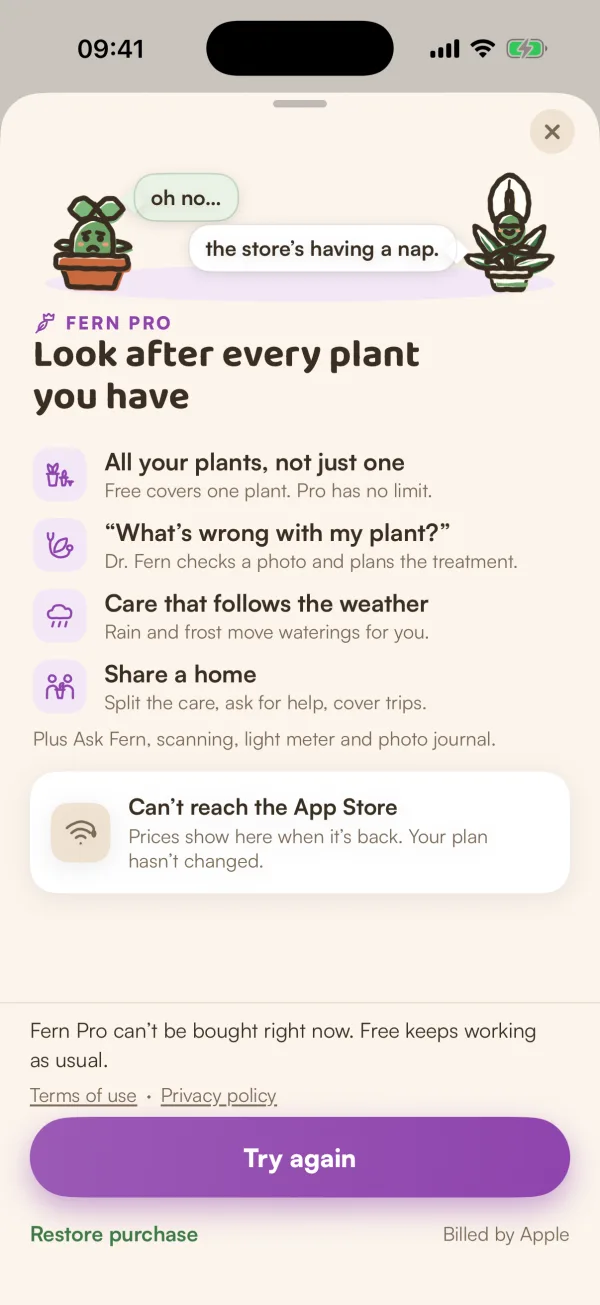
The plans screen says "Can’t reach the App Store" with "Prices show here when it’s back. Your plan hasn’t changed." Fern couldn't get the prices from Apple.
- Check your connection.
- Tap Try again.
Nothing about your plan changes while the store is out of reach.
The purchase didn't go through
If buying fails, Fern says "That didn’t go through — try again." and "Nothing was charged." Check your connection and that you're signed in to the App Store, then try again.
If you closed Apple's payment window yourself, nothing happens and nothing is charged.
If a purchase needs someone's approval first, such as Ask to Buy in Family Sharing, Fern Pro turns on once it's approved.
You paid, but Fern Pro isn't showing
- Open You and scroll to Account.
- Tap Restore purchases.
Fern asks the App Store what this Apple ID has bought, then says one of these:
| Fern says | What it means |
|---|---|
| "Fern Pro restored" | Fern Pro is on again. |
| "No purchases to restore" | The App Store has no Fern Pro on the Apple ID signed in on this phone. |
| "Couldn’t reach the App Store — try again" | Fern couldn't ask. Check your connection and try again. |
You'll also find Restore purchase on the plans screen.
If you see "No purchases to restore", check that this phone is signed in to the App Store with the Apple ID you paid with.
Change, cancel or get a refund
Apple and Google handle these. Change or cancel in You › Membership › Manage subscription, which "Opens your App Store subscriptions to change or cancel." Refunds are handled by Apple or Google under their rules. See Manage or cancel Fern Pro.
What if…
What if I deleted my Fern account but I'm still being charged?
Deleting your account doesn't cancel the subscription. Cancel it in your App Store subscriptions, or Google Play on Android.
What if it says the free trial was already used on this phone?
The free trial is once per account and once per phone. You can still subscribe. See Your free trial.
What if none of this helps?
Write to contact@fernplant.app with what you see. A screenshot of the message helps.