
Find your plants
My Plants lists every plant you look after. Search by name, species or room, use the care chips and filters, and switch between cards and a list.
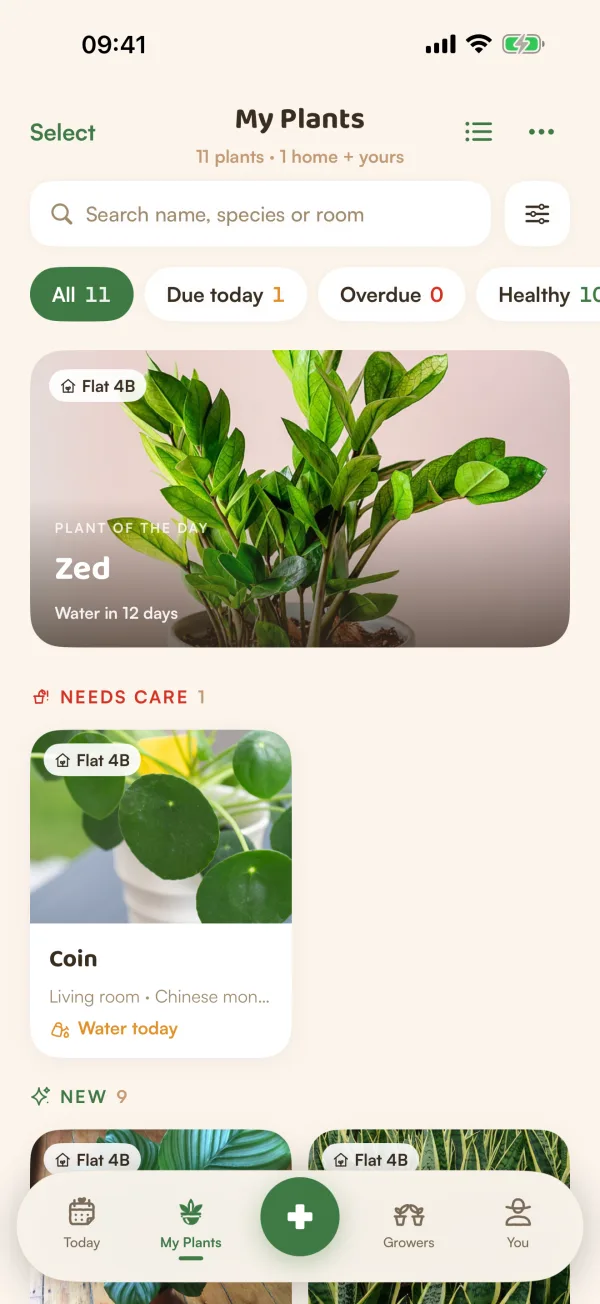
My Plants is your whole garden in one place: your own plants and the ones in homes you share. It opens from the tab bar, and it's where you search, filter and pick plants to work on.
What's on the page
- Under the title, how many plants you have and where: "11 plants · 1 home + yours".
- PLANT OF THE DAY: one plant shown big, a different one each day (in the card layout).
- Your plants in groups: Needs care, New, Doing well and Resting (plants resting on the free plan).
- Each plant shows its name, its room and species, and its next care: "Water today", "Water in 12 days", "Water · 2 days late".
- A plant in a shared home carries the home's name, like Flat 4B.
Tap a plant to open its page. Touch and hold one for Open plant, Log watering and Log misting.
To switch between big photo cards and a compact list, tap the button beside ••• at the top.
Search
Type in Search name, species or room. Fern searches as you pause typing. "Kitchen" finds everything in the kitchen; "pothos" finds every pothos, whatever you named it.
Tap the × in the field to clear it.
Care chips
Under the search, tap a chip to see only those plants. Each shows how many there are.
| Chip | Shows |
|---|---|
| All | Every plant |
| Due today | Plants with care due today |
| Overdue | Plants with care from earlier days still waiting |
| Healthy | Plants with nothing due today or late |
Filters
Tap the filters button beside the search (or ••• › Filters) for more:
- Household and Room: one home, one room, or Just me.
- Light need: Low, Medium, Bright or Direct.
- Caretaker: Me, Nobody yet, or someone in your home.
- Mood: Thriving, Thirsty, Struggling or New.
- Care type: Watering, Feeding or Misting. It narrows Due today and Overdue to that kind of care.
- Sort by: Next care, Name A–Z, Recently added or Health.
- Toxic to pets only and Imported only (plants brought in from a spreadsheet, a list or a photo).
The button at the bottom says how many plants match: "Show 4 plants". Tap Reset to clear everything. While filters are on, the filters button shows how many.
Tips
- Household, Room and Caretaker only appear once you have a home with rooms and people.
- Imported only is handy right after an import, to check the plants you brought in. See Import plants from a list or another app.
- Pull the page down to refresh it.
What if…
What if a search finds nothing?
Fern shows "No plants match" what you typed. Try a name, a species or a room, or tap Clear search.
What if My Plants says "Couldn't show your plants"?
The garden didn't load. Pull down to try again. If you're offline, see Fern can't connect.
Why do some plants say "Resting · no reminders"?
On the free plan Fern looks after one plant; the others rest. See When the free trial ends.