
Invite people to your home
Share your home's code, send it as a message, or invite someone by email. Inviting is part of Fern Pro; joining is free for them.
On this page
Once the people you live with are in your home, everyone gets reminders for the plants they look after, and anyone can log care. Every home has a code. Give it to them, and they join from their own phone.
Invite someone
- Open your home: on You, under Households, tap the home.
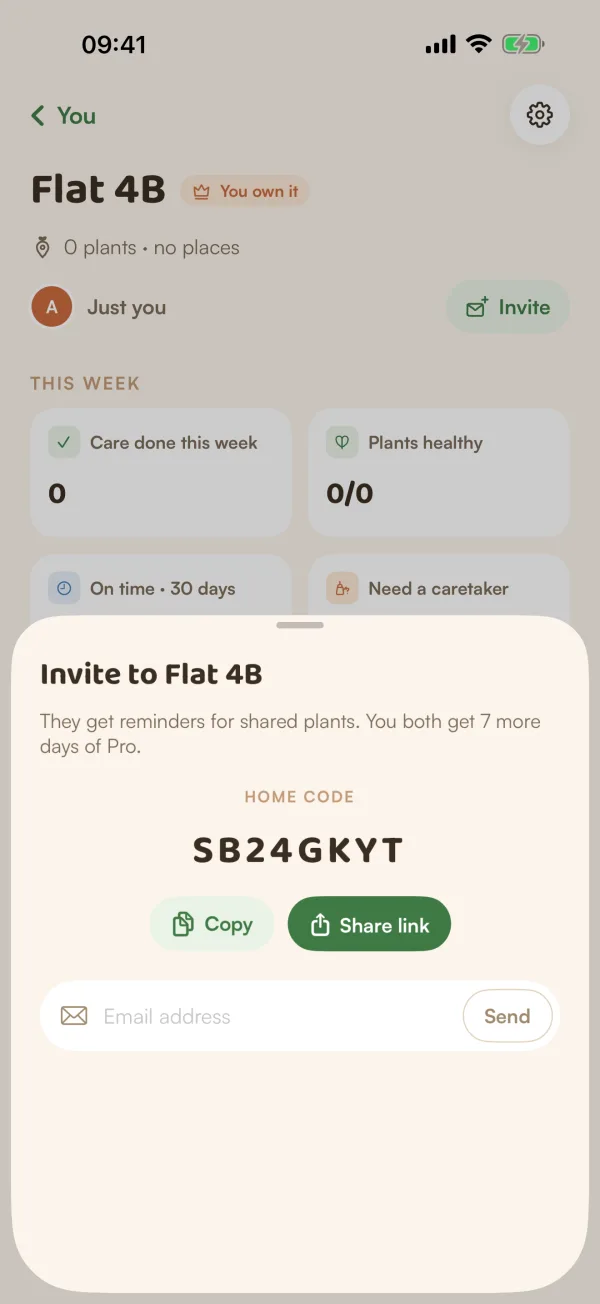
- Tap Invite, next to the faces at the top.
- Choose how to send it:
- Copy puts the code on your clipboard, to paste wherever you like.
- Share link opens your phone's share sheet with a ready-made message: the home's name, where to go in Fern (You → Households → Join with a code) and the code.
- Type their Email address and tap Send.
The sheet says what joining means: "They get reminders for shared plants. You both get 7 more days of Pro."
You'll also find Invite someone at the bottom of the home's People screen, and the code under This home, Invite code.
Inviting by email
When you send an invite by email, Fern says "Invite sent to" the address. Fern doesn't send an email: the invite waits inside Fern for whoever signs in with that address. If they already have a Fern account with it, they get a notification. They'll see "Ana invited you to Flat 4B" with Accept and Decline.
Invites you've sent show under Waiting in the invite sheet and on People, with when you sent them ("Sent today", "Sent 2 days ago"). An invite lasts 7 days. To take one back, tap Cancel next to it on People.
A week of Pro for each of you
When someone new to Fern joins your home, they get 7 more days of Fern Pro, and so does whoever brought them: the person who sent their email invite or, when they join with the code, the home's owner. If you're on a trial, the days are added to the end; if your Pro had ended, it starts again today.
- "New" means their Fern account is less than two weeks old, and it's their first one.
- Each new person brings this once.
- Someone using Fern as a guest counts once they save their garden.
- You can earn this up to 3 times.
- If you already pay for Fern Pro, only they get the extra days.
Free and Fern Pro
Inviting people is part of Fern Pro. On the free plan, the Invite button and the Invite code row show a PRO tag, and tapping them shows what Pro adds. If your plan changes while the sheet is open, Fern says "Inviting people is part of Fern Pro."
Joining is free for the person you invite, and so is caring for every plant in the home once they're in.
Tips
- Sending the code by message is the quickest way. If they already have a home in Fern, Join a home says how they get to where they type it.
- Only want people you've invited? The home's owner can stop the code from working with New members can join with the code, in home settings.
What if…
What if it says "You've reached your limit for now"?
There's a daily limit on email invites, and a lower one for the same address (sending again after cancelling counts too). Fern says when you can try again. Or send the code instead.
What if they say the code doesn't work?
Check it letter by letter. If the owner turned off New members can join with the code, nobody can join with it until it's back on. If someone was removed from the home, the code changed: share the new one from Invite code.
Can other people in the home invite too?
Yes, anyone in the home who has Fern Pro can invite. Only the owner can remove people.