
Search Growers
Find posts, questions and growers by what they say, the plant they're about, where growers are and more. Search is free once you've joined Growers.
On this page
Someone has probably asked about your plant's problem before. Search finds it: posts and questions by the words in them, and growers by name, by the plants they grow or by where they are. Searching is free.
Search
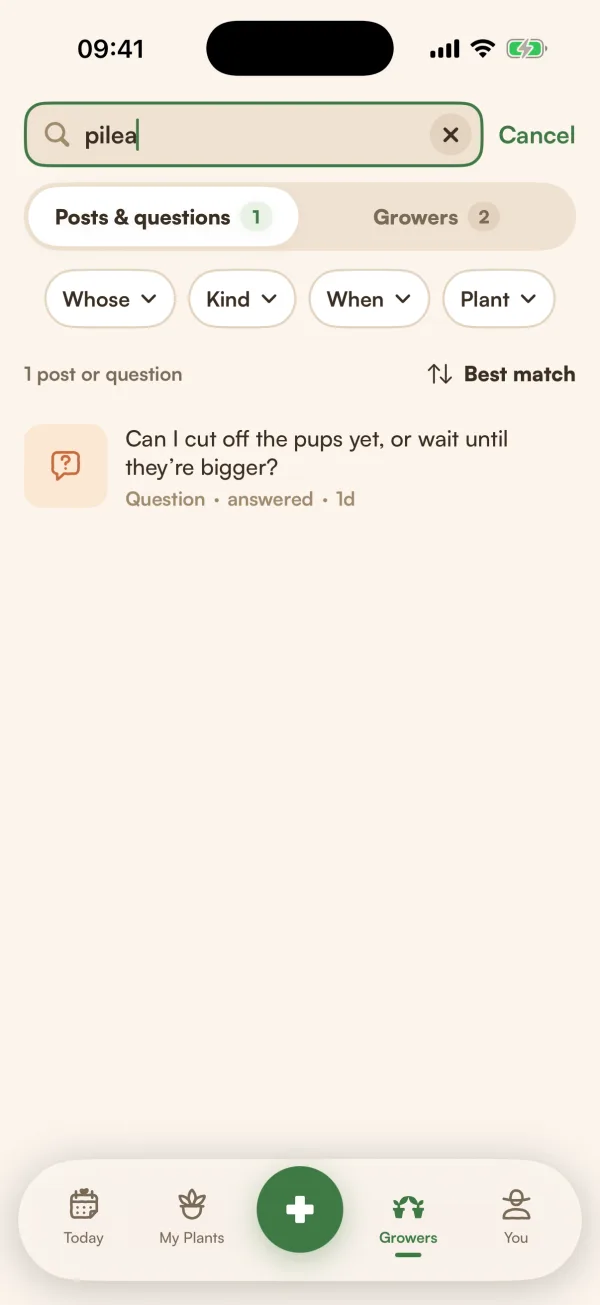
- On Growers, tap the magnifying glass at the top.
- Type in Search posts or growers.
- Choose a tab: Posts & questions or Growers.
- Narrow it down with the filters under the search bar, and change the order with Sort.
The number of results shows above the list. Tap a result to open it. To start again, tap the ✕ in the search bar, or Cancel to close search.
Search looks at what posts and questions say, not at their comments. For growers, type a name or a handle; you don't need the @.
Filters for posts and questions
| Filter | Choices |
|---|---|
| Whose | Everyone, or People you follow |
| Kind | Posts & questions, Posts, Questions, Has a poll, Has a quiz |
| When | Any time, Past week, Past month, Past year |
| Plant | One plant, or a whole plant group |
| Answers (for Questions) | Any answers, Has a helpful answer, No answers yet |
| Sort | Best match, Newest, Most liked |
When you open search from Following, it starts with posts from people you follow.
Filters for growers
| Filter | Choices |
|---|---|
| Where | Anywhere, Your city, Your region, Same climate |
| Grows | People who grow a plant you pick |
| Helpful on | People whose answers about a plant were marked helpful |
| Active | Any time, Posted this week, Posted this month |
| You and them | Everyone, Not followed yet, You follow, Follows you |
| Sort | Best match, Most helpful, Most active, Newest to Growers |
Where "Uses the area each grower chose to show. Never distance or a pin."
A filter in use turns green. To clear one, open it and choose its first option. To clear them all, tap Clear at the start of the filter row.
Before you type
With nothing typed, Posts & questions shows your Recent searches (tap Clear to remove them), the Plant library and Fern's Guides. Growers shows Growers like you and On the Growers map, for who's growing what around you.
Free and Fern Pro
"Search is free. Following growers comes with Fern Pro." You can open any post or profile you find. Commenting, liking and following need Fern Pro.
Tips
- Search a symptom and a plant together, such as "pothos yellow", then set Kind to Questions and Answers to Has a helpful answer.
- Fewer words find more. Search only matches posts that have all the words you typed.
What if…
What if it says "Nothing matches all those words"?
Try fewer words, or check the spelling. If no one has asked yet, tap Ask it as a question to ask Growers yourself.
What if I can't find someone by name?
"Only growers who chose to be found show up here." People can turn off Let growers find me in their settings. You can still reach them from their posts.
What if it says "Can't reach Fern"?
Your phone is offline or Fern can't reach the server. Search shows what loaded earlier. Tap Retry when you're back online.