
Browse Growers
Growers is Fern's community tab. Read posts, questions and plant photos from other growers in For You and Following. Reading is free, even before you join.
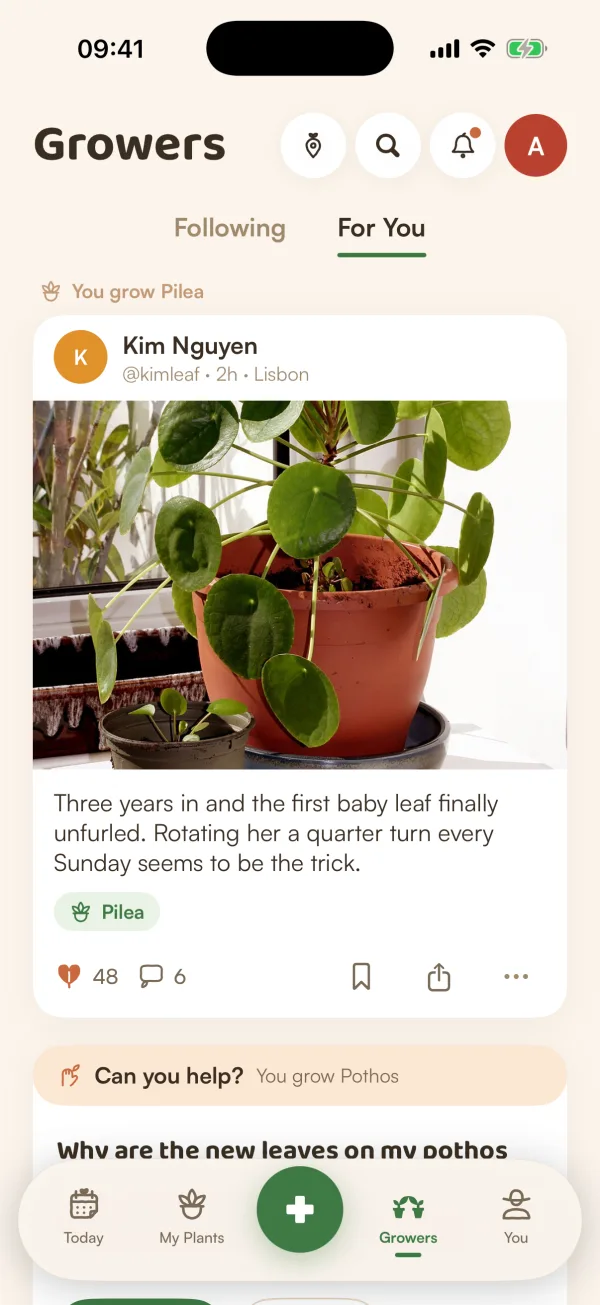
Growers is the tab where people who use Fern show their plants, ask for a second opinion and answer each other. Anyone can read it, guests included. You only need a profile when you want to post, answer or follow.
Open Growers
Tap Growers in the bar at the bottom of the screen. At the top you'll find:
- Following and For You, the two feeds. Growers opens on For You the first time, then on the feed you used last.
- A map button for the Growers map.
- A magnifying glass to search Growers.
- A bell for Activity: answers, Helpful marks, new followers and questions you could answer. A dot means something is new.
- Your photo, which opens your profile once you've joined.
Pull the feed down to refresh it. Switching between the two feeds keeps your place in each.
For You
For You starts from your garden. A short line above each card says why it's there, such as the plant you grow that it's about. Between posts and questions you'll also see photos from plants people share, guides from Fern, and Growers like you, people who keep the same kind of plants.
The first time you open it, Fern may show Your feed starts from your garden. Your own plants are already ticked. Under "Anything else you're into? Optional", tap any other plants or groups you'd like, then Done, or tap Skip.
Questions show how they're doing at the bottom of the card: Unanswered, a number of answers, or Helpful answer once the asker picked one.
Can you help?
Sometimes a question about a plant you grow comes with Can you help? above it. Tap Answer to open it, or Not now if you'd rather not. A question you set aside with Not now won't come to you again.
Following
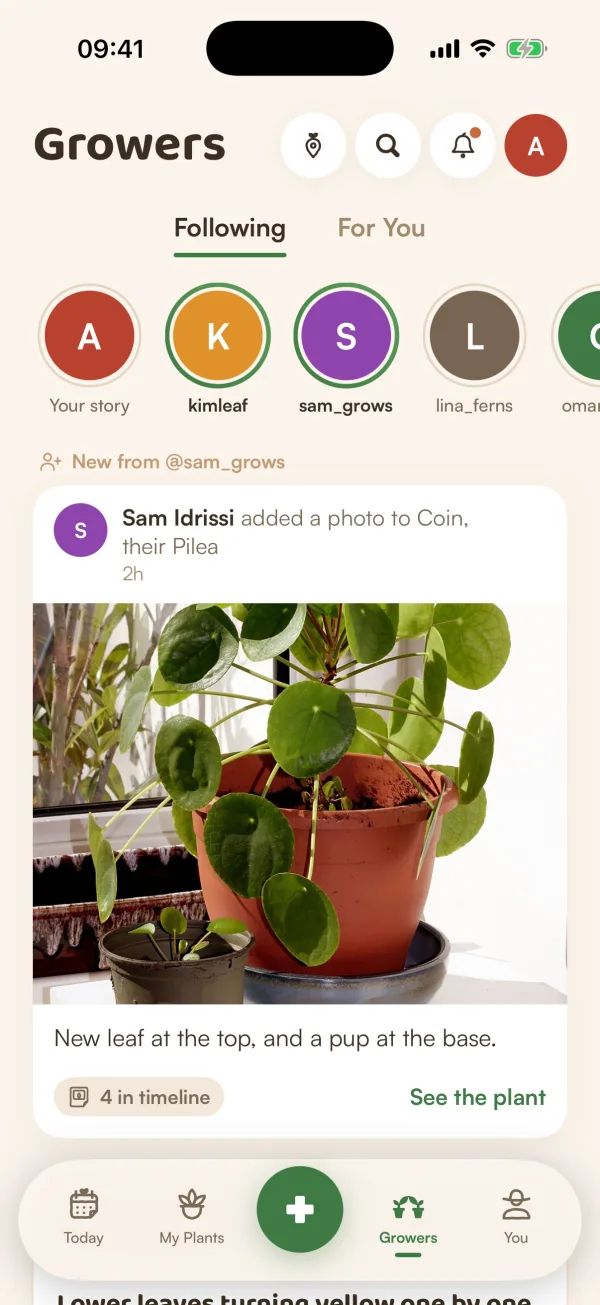
Following shows what the people you follow share, newest first: their posts, notes, questions, the plants they share and new photos of them. Each one starts with a line like "New from @sam_grows".
Their stories sit in a row of rings at the top, with yours first once you've joined. A green ring means there's something new. See Share a story.
When you've seen everything, Following says "You're all caught up". Tap See For You to keep reading. If you don't follow anyone yet, it shows "Follow a few growers" with some people to start with.
See less of something
Tap ••• on a card in For You for Not interested:
| Choose | What changes |
|---|---|
| Fewer like this | Shows less of this kind of post. |
| Fewer from @name | Less from that person. You'll still see them in Following if you follow them. |
| Fewer about a plant | Less about that plant. Questions from its growers still reach you if you grow one. |
| Report | Sends it to our team, privately. See Report or block someone. |
The card folds to a line, such as "Got it. You'll see fewer like this", with Undo in case you didn't mean it.
Free and Fern Pro
Reading Growers is free for everyone. What you can do beyond reading depends on where you are, and a card at the top of the feed says so:
| You are | The card says | What it means |
|---|---|---|
| Using Fern as a guest | Save your garden to join in | You can read everything. Save your garden first to join. |
| Signed in, not joined | Join to post and follow | Tap Join Growers. Joining is free. |
| Joined, free plan | "Reading, search and saving are free. Posting, answering, following and sharing plants come with Fern Pro." | Tap See Pro for the plans. |
Tips
- On your own posts, a line only you can see shows how far they went, such as "Seen by 230 growers · 18 likes · 4 saves".
- Tap someone's name on a card to see their profile and the plants they share.
What if…
What if Growers says "Couldn't load Growers"?
Fern couldn't reach the server. Tap Try again. If your phone is offline, Growers shows what it loaded before and catches up when you're back.
What if Following is empty?
You don't follow anyone yet, or the people you follow haven't shared anything new. Look through For You or Growers like you and follow a few people. Following needs Fern Pro.
Do the people I follow know when I read their posts?
Not for posts: their author only sees a count, such as "Seen by 230 growers". Stories are different. The person who shared a story can see who watched it.