
Postpone a task
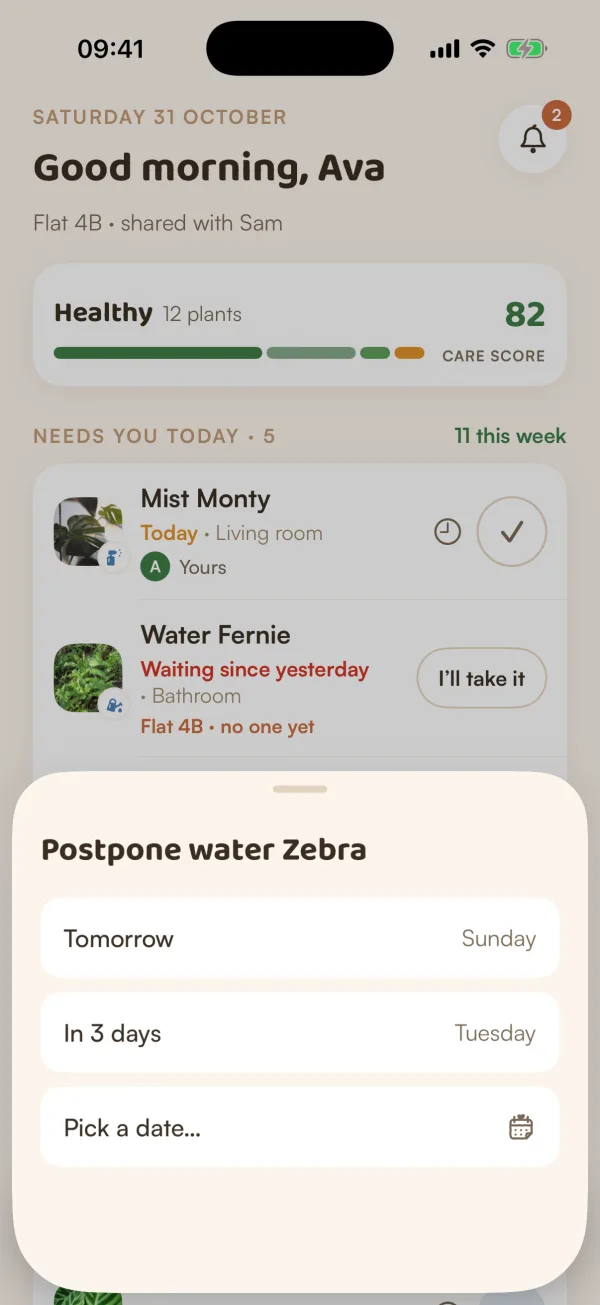
Move a watering or any other care to tomorrow, three days from now or a day you pick. The task leaves Today and comes back on its new day.
On this page
Some days the plants can wait: you're out, the plant looks fine, or today isn't the day. Postponing moves the task without marking it late.
Move a task to another day
- On Today, tap the clock next to the task.
- Choose when:
- Tomorrow
- In 3 days
- Pick a date… to choose any day in the next two months, then tap Move to that day.
- The task leaves Today, and a note confirms it: "Moved to tomorrow", "Moved to Thursday" or "Moved to 12 Oct".
Each choice shows the day it lands on, so you know before you tap.
You can also touch and hold a row and choose Not today. It opens the same choices.
What changes
- The task's due day becomes the day you chose. Until then, it doesn't count as waiting, and it won't be marked Urgent.
- Its reminder is sent again on the new day.
- It doesn't hurt your care score: a postponed task isn't a late one.
Postponing lots at once
When many things have piled up, you don't need to postpone them one by one. See Catch up when things pile up: Postpone the rest keeps the five most urgent and spreads the others over the next three days.
Postpone or soil check?
For watering, a soil check is often the better choice. If the soil is still moist, Safely wait moves the watering two days and teaches Fern that this plant drinks more slowly. Postponing just moves the day. See Check the soil before watering.
What if…
What if I postponed the wrong task?
Open the plant from My Plants and do the care from its page. When the task comes back on its new day, it will already be done.
What if I'm going away for a while?
Don't postpone everything. Tell Fern you're away instead: care is paused and nothing counts as late while you're gone. With Fern Pro, you can also hand your plants to someone in your home until you're back.